

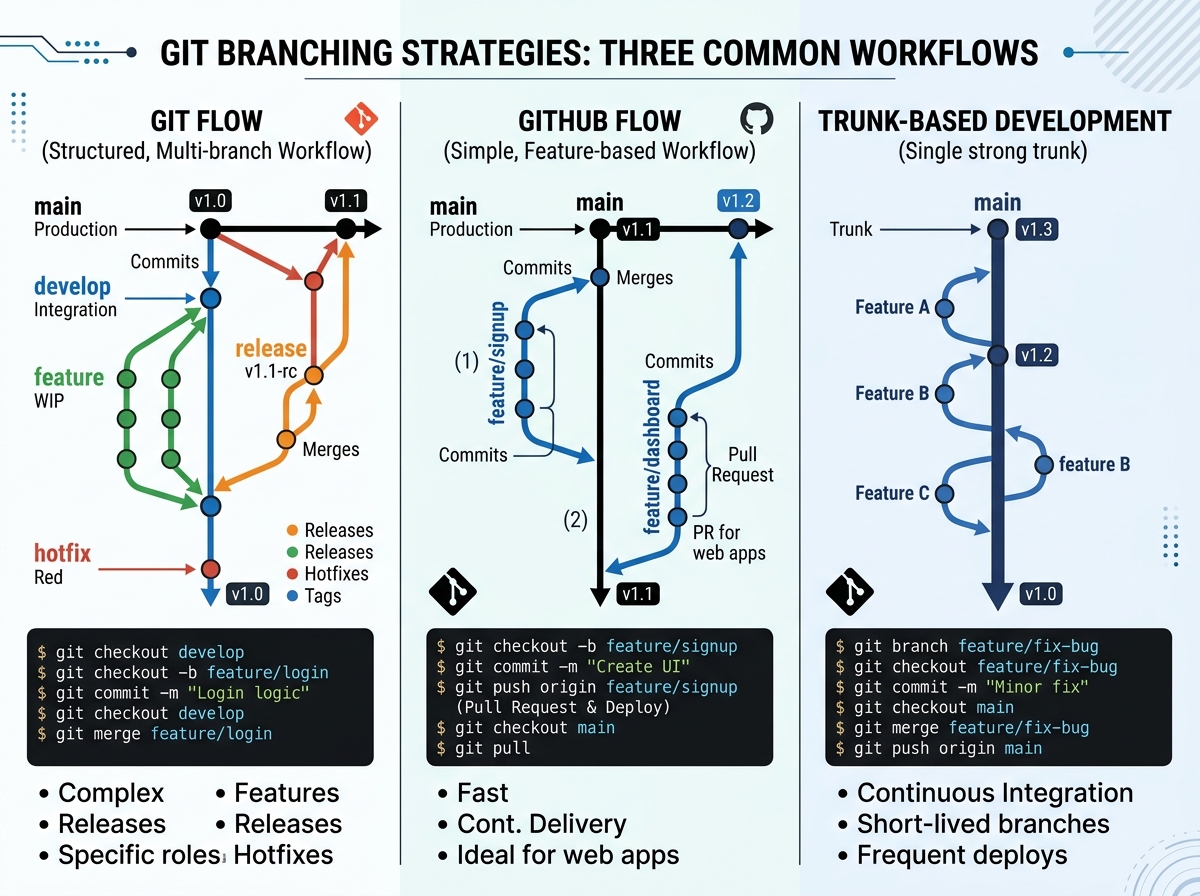
Remote development teams need disciplined version control. Without face-to-face communication, Git workflows become your team's coordination backbone. Here's how to choose and implement the right strategy.
Git Flow: The Classic Approach
Git Flow uses two main branches:
master (production) and develop (integration). Feature branches branch from develop, release branches prepare deployments, and hotfix branches patch production directly.Best for:
Teams with scheduled releases, enterprise environments, and QA processes.
Pros:
Clear separation of concerns, supports parallel development. Cons: Complex, overkill for continuous deployment, merge conflicts accumulate.
GitHub Flow: Simplified and Agile
A single
main branch with feature branches that merge via pull requests. Deployments happen directly from main after merge. No release or develop branches.Best for:
SaaS products, continuous deployment, small to medium teams.
Pros:
Simple, fast, encourages small, frequent deployments. Cons: Requires robust CI/CD and automated testing. Not ideal for versioned releases.
Trunk-Based Development: Maximum Velocity
Developers commit directly to
main or very short-lived feature branches (under 24 hours). Feature flags hide incomplete work. Requires comprehensive automated testing.Best for:
High-performing teams, microservices, platforms requiring daily deployments. Pros: Fastest feedback loops, minimal merge conflicts, true continuous integration.
Cons:
Requires mature testing culture and feature flag infrastructure. High initial investment.
Branch Naming Conventions
Use descriptive prefixes:
feature/user-authentication, bugfix/login-error, hotfix/payment-gateway. Include ticket IDs: feature/GTS-123-api-rate-limiting. Consistent naming makes branch purpose immediately clear.Pull Request Best Practices
Keep PRs small—under 400 lines of code. Include clear descriptions with what, why, and how. Add screenshots for UI changes. Require at least one review before merging. Use draft PRs for early feedback.
Commit Message Standards
Follow conventional commits:
feat:, fix:, docs:, style:, refactor:, test:, chore:. Write imperative mood: "Add user login" not "Added user login." Reference issues: feat: add OAuth login (closes #456).Handling Merge Conflicts
Pull
main before starting work. Rebase feature branches regularly. Use git merge --no-ff for feature branches to preserve history. For complex conflicts, pair program with the developer who wrote the conflicting code.Code Review Culture
Reviews aren't gatekeeping—they're knowledge sharing. Automate style checks with linters so reviewers focus on logic. Rotate reviewers to spread domain knowledge. Respond to feedback within 24 hours.
CI/CD Integration
Run tests on every push. Block merges if tests fail. Use branch protection rules. Deploy automatically to staging after merge. Require manual approval for production deployments.
Documentation
Document your workflow in
CONTRIBUTING.md. Include setup instructions, branch strategies, and deployment procedures. Update documentation when processes change.Conclusion
The best Git workflow is one your team consistently follows. Start with GitHub Flow for simplicity, graduate to trunk-based development as your automation matures. The goal is shipping value to users, not perfect branch graphs.